Tag Assignment
This Screen is a quick way of editing Tags. It works like a shortcut, available from the First Steps: Home Screen
It is usually used for Assigning new Tags or Setting up a new Work Order for a new Cycle of Operation.
A Barcode Scanner is also available for Devices with a Camera.
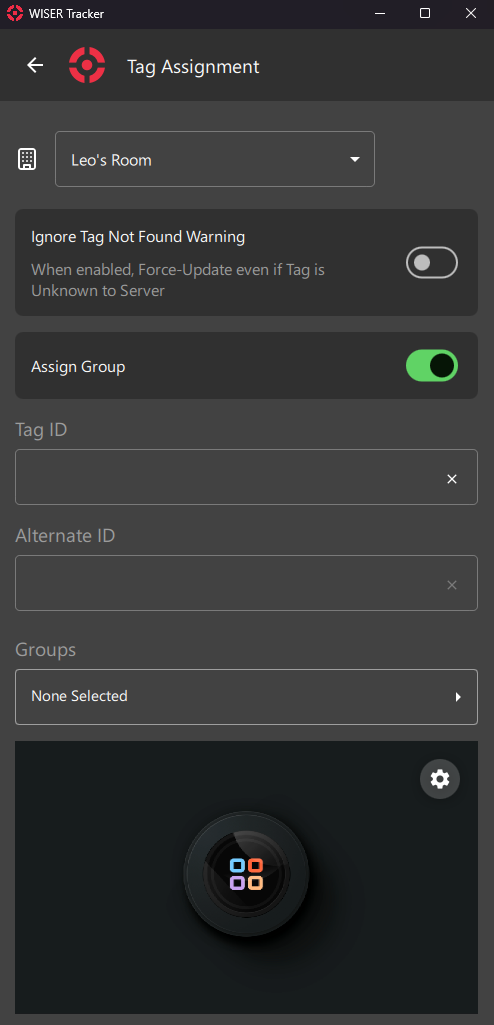
Arena Filter
Select the Arena you want to Assign Tags.
Special Options
Ignore Tag Not Found Warning
Sometimes recently arrived Tags still haven't got a Ping from the server and so, they are Unknown.
To avoid such warning and a Failed Update, you can toggle this option.
Assign Group
This option will enable/disable the Groups Field
Input Fields
Tag ID
Tag Hex ID
You can use a Keyboard, a Portable Barcode Scanner or your Device's Camera.
Alternate ID
You can use any kind of internal ID, like Work Order, Part Number and so on.
Groups
Select Pre-defined Groups
Info
NOTE
Assign Group Option must be Enabled
Camera Preview
Camera-Available Devices will have a Preview Screen. You can click the Gear Icon for a few Settings and Camera Device Selection.